
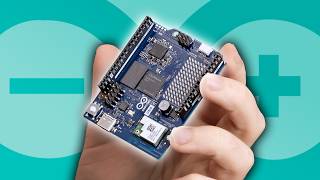
The battle between x86 and ARM architectures has always been a topic of fascination. While x86 has long dominated the desktop space, ARM, known for its power efficiency and mobile roots, is making a surprising push into gaming and high-performance computing. If you’re curious about how to game on an ARM-based computer, this guide will walk you through the process of setting up a functional gaming environment using an Arduino-like device and the Steam Frame. Whether you’re a tech enthusiast or a beginner, this article will explain the challenges, tools, and potential of ARM in gaming.
The journey begins with understanding the hardware. Unlike traditional desktops, which rely on x86 processors, ARM-based systems like the Qualcomm Snapdragon or the Raspberry Pi use a different architecture. This means that software, especially games, isn’t natively optimized for ARM. To bridge this gap, tools like FEX (Fast Emulation eXecution) are used to translate x86 code into ARM-compatible instructions. This process, however, is resource-intensive and requires careful setup.
Setting up an ARM-based gaming rig involves more than just plugging in a device. You’ll need to install a Linux distribution, configure swap space, and ensure your system has enough RAM and storage. For example, the Arduino-like device in this guide starts with only 2 GB of DDR4 RAM and 16 GB of internal storage—far from ideal for modern gaming. To expand storage, external drives like the Cheza M.2 SSD are used, adding gigabytes of space. However, even with these upgrades, the system struggles with the computational demands of gaming.
Once the hardware is ready, the next step is installing the necessary software. Steam, the popular gaming platform, isn’t natively supported on ARM. Instead, you’ll use FEX to emulate x86 environments. This involves installing Linux, configuring the FEX emulator, and downloading the Steam client. The process is fraught with challenges, such as low swap space, missing dependencies, and compatibility issues. For instance, installing Steam on an ARM device might require manually downloading packages, setting up a swap partition, and troubleshooting missing libraries like SquashFS.
Even after these steps, performance is a major concern. Games like *Half-Life 2* and *Lego Star Wars* run at a fraction of their expected frame rates on ARM-based systems. While *Half-Life 2* managed a mere 4 FPS in some tests, the system’s limitations become apparent. The lack of native Linux ports for many games adds another layer of complexity, forcing users to rely on dual translation layers: first from Windows to Linux, then from x86 to ARM. This double overhead significantly slows down performance.
Despite the challenges, ARM-based gaming isn’t entirely hopeless. For lightweight or retro games, the experience can be tolerable. The Steam Frame, for example, leverages Qualcomm’s Snapdragon processors to run x86-compatible games via FEX. However, even this setup requires substantial optimization. The device’s ARM CPU struggles with modern graphics and audio, often resulting in lag, low resolution, or missing sound. In some cases, users have to manually adjust video settings to the lowest possible to achieve playable frame rates.
For beginners, the key takeaway is that ARM-based gaming is still in its infancy. While tools like FEX and the Steam Frame show promise, the ecosystem lacks the maturity of x86. If you’re considering this route, be prepared for a steep learning curve, patience, and a willingness to troubleshoot. Additionally, ensure your system has adequate RAM, storage, and cooling, as ARM devices can overheat under heavy workloads.
For those looking to dive deeper into ARM development or explore alternative computing paths, platforms like the Raspberry Pi offer a more accessible starting point. However, the Arduino-like device in this guide highlights the potential of ARM in niche applications. Whether you’re a hobbyist or a professional, experimenting with ARM-based systems can be a rewarding experience—just don’t expect it to replace your traditional gaming rig anytime soon.