

Have you ever built a cool website on your laptop and wished your friends across the city could see it without you paying for expensive hosting? Usually, your home router acts like a shield that blocks outside traffic. Today, we are exploring pgrok, a clever tool that creates a private tunnel for your data.
When you develop a project locally, your computer is assigned a private IP address that is only visible to devices connected to your home Wi-Fi. If you want someone on the internet to access your local server, you typically need a reverse proxy. While many professionals use a service called ngrok, pgrok is a fantastic self-hosted alternative that gives you more control and privacy. It is built using the Go programming language and leverages a very sophisticated networking library called libp2p. This allows it to handle multiple users and even inspect the data moving through the tunnel, which is incredibly helpful when you are trying to find bugs in your code.
The magic of pgrok lies in its architecture, which consists of two main parts: the server component known as pgrokd and the client component simply called pgrok. To get started, you first need a small virtual private server with a public IP address to act as the “meeting point” for your traffic. You begin by downloading the server binary to your remote server and generating the necessary configuration files. Instead of using a complex setup process, you simply define the domain names you want to use and ensure your firewall allows traffic through the specific ports used by the application. This server part stays awake and waits for your home computer to call it, creating a secure bridge between the public internet and your private network.
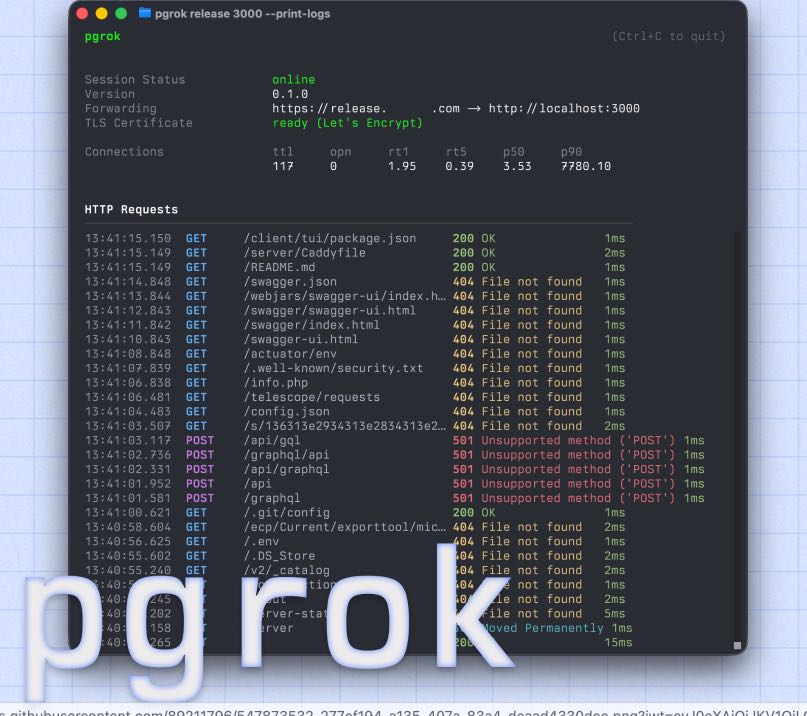
Once the server is running, you move back to your local machine to set up the client. You will need to create a small configuration file in your home directory that tells the pgrok client where your remote server is located. This file usually includes an authentication token to ensure that only you can use your tunnel, preventing random strangers from hijacking your connection. After saving your settings, you start the client and tell it which local port you want to share. For example, if your web project is running on port 8080, you command the pgrok client to map that local port to the remote server. Immediately, the libp2p protocol works its magic to find the best path through your router’s defenses, establishing a stable connection that stays active as long as the program is running.
One of the most impressive technical features of pgrok is its introspection capability. When people visit your public URL, pgrok records the headers and bodies of the requests they send. You can open a special web interface on your local machine to see exactly what data is arriving in real-time. This is much better than just guessing why a form isn’t working or why an image is failing to load. You can see the HTTP methods, such as GET or POST, and even replay those requests with a single click to test your code again without having to manually refresh a browser or re-submit a form. This saves developers a significant amount of time during the debugging phase.
Security is another area where pgrok shines compared to older methods of opening your network. In the past, people would use “port forwarding” on their routers, which is quite dangerous because it leaves a permanent hole in your digital fence. With pgrok, the connection is outbound from your computer to the server, meaning your router doesn’t have to allow untrusted incoming connections. Furthermore, because pgrok supports multiple users, you can let your classmates or teammates use the same server to host their own tunnels without everyone seeing each other’s private data. It organizes traffic by subdomains, so every project gets its own unique address on the internet while sharing the same underlying infrastructure.
In conclusion, pgrok is a powerful yet accessible tool for any young developer who wants to bridge the gap between their local workspace and the wider world. By understanding how to deploy the server and configure the client, you gain a valuable skill in networking that many adults find difficult to master. I recommend that you start by setting up a simple “Hello World” page and try to make it visible on your smartphone using a pgrok tunnel. This hands-on experience will solidify your understanding of how the internet truly functions behind the scenes.
Github Page: https://github.com/R44VC0RP/pgrok