
MOS is a new open-source server operating system designed for home labs and self-hosting enthusiasts. Built on Linux, it focuses on simplicity, performance, and flexibility for users who want to run their own services at home.
Unlike traditional server OSes, MOS avoids unnecessary complexity while providing tools for managing containers, networking, and security. It targets individuals and small teams who want to experiment with self-hosting without the overhead of enterprise-grade systems.
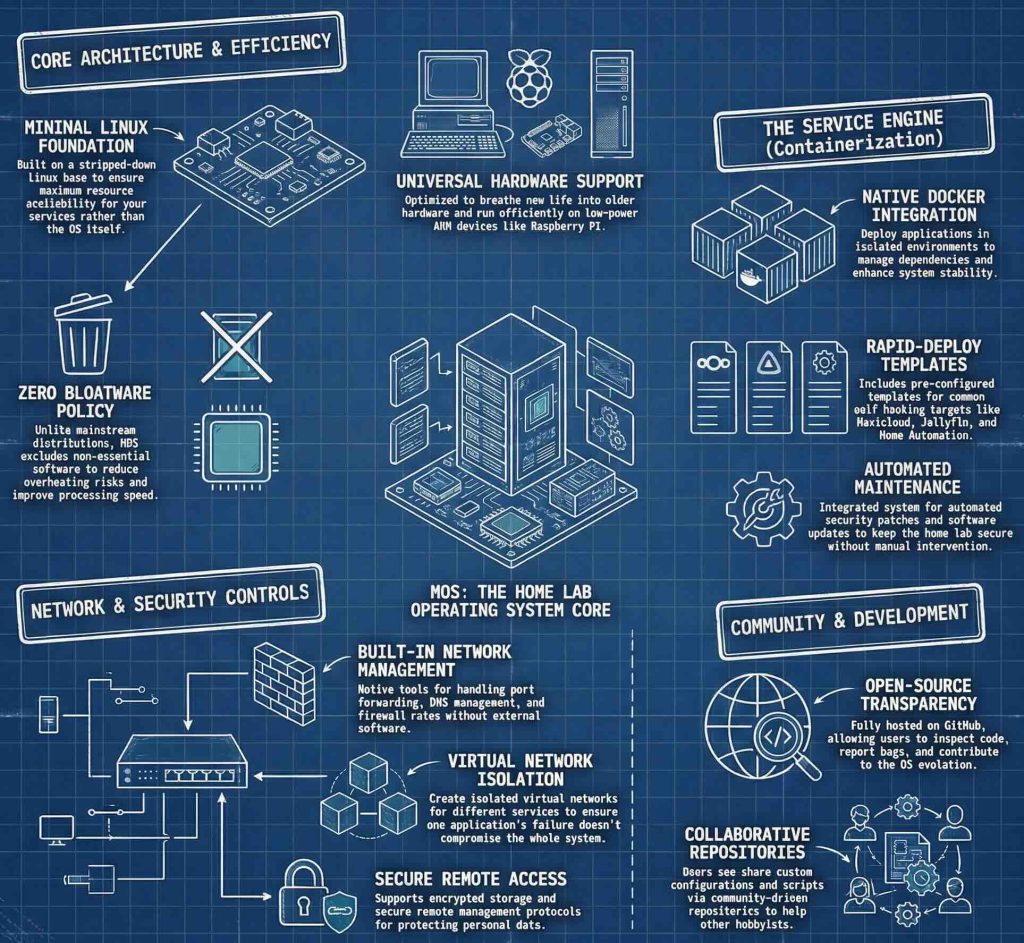
MOS is built on a minimal Linux base, ensuring it uses fewer resources while maintaining full functionality. This makes it ideal for older hardware or low-power devices like Raspberry Pi. The OS includes pre-configured tools for common self-hosting tasks, such as running web servers, databases, and media services. Developers can customize the system by adding packages or modifying configurations through a simple interface. The project emphasizes user-friendliness, with documentation and community support tailored for beginners and advanced users alike.

A key feature of MOS is its containerization support. It integrates with Docker and other container runtimes, allowing users to deploy applications in isolated environments. This helps manage dependencies and improve security without requiring full system reconfigurations. The OS also includes automated updates and security patches to protect against vulnerabilities. For home labs, MOS provides pre-built templates for common use cases like file storage, personal cloud, and home automation. These templates reduce setup time, letting users focus on experimentation rather than configuration.
MOS is open-source, meaning anyone can contribute to its development or modify it for specific needs. The project is hosted on GitHub, where users can report bugs, request features, or submit code improvements. This community-driven approach ensures the OS evolves based on user feedback. Compared to other Linux distributions, MOS avoids bloat by excluding non-essential software, making it faster and more efficient. Its lightweight nature also reduces the risk of hardware overheating or performance issues on older devices.

For self-hosting, MOS simplifies network configuration through built-in tools for port forwarding, DNS management, and firewall rules. Users can create virtual networks to isolate services, ensuring one application’s failure doesn’t affect others. The OS also supports encrypted storage and remote access features, which are critical for securely managing personal data. Advanced users can leverage scripting and automation to streamline repetitive tasks, while beginners benefit from guided setup wizards and tutorials.
MOS is not just for technical experts. Its design prioritizes accessibility, with a clean interface and clear documentation. This makes it a great choice for educators, hobbyists, or anyone interested in learning about server management.
By using MOS, users gain hands-on experience with Linux while avoiding the steep learning curve of traditional server OSes. The project also encourages collaboration, as users can share their configurations or contribute to shared repositories for common services like Nextcloud or Jellyfin.
The development team behind MOS emphasizes transparency and stability. Regular updates include performance improvements, bug fixes, and new features based on community feedback. This ensures the OS remains reliable for both casual use and more demanding workloads.
For those looking to build a home lab or start self-hosting, MOS provides a solid foundation without the complexity of enterprise solutions. Its focus on simplicity and customization makes it a compelling alternative to mainstream server OSes.
Github page: https://github.com/ich777/mos-releases