

Linux users who rely on the Cosmic Desktop environment now have access to version 1.0.8, which brings significant updates to the interface, performance, and compatibility. This release focuses on refining the user experience, addressing bugs, and integrating better support for modern hardware and software. For developers and power users, the changes include deeper customization options and improved integration with GNOME Shell extensions. The update also introduces optimizations for Wayland compositors, ensuring smoother graphics rendering and reduced latency in applications. This version is recommended for anyone using Cosmic Desktop on Ubuntu-based systems or other Linux distributions that support it.
The Cosmic Desktop environment, built on top of GNOME Shell, has long been praised for its clean design and flexibility. Version 1.0.8 continues this tradition by adding several enhancements that make the desktop more responsive and user-friendly. One of the most notable changes is the improved handling of window animations, which now use hardware acceleration more efficiently. This means that users will notice faster transitions between windows and applications, especially on systems with modern GPUs. Additionally, the developers have fixed several bugs that caused crashes in specific scenarios, such as when using multiple monitors or running resource-intensive applications like video editing software.
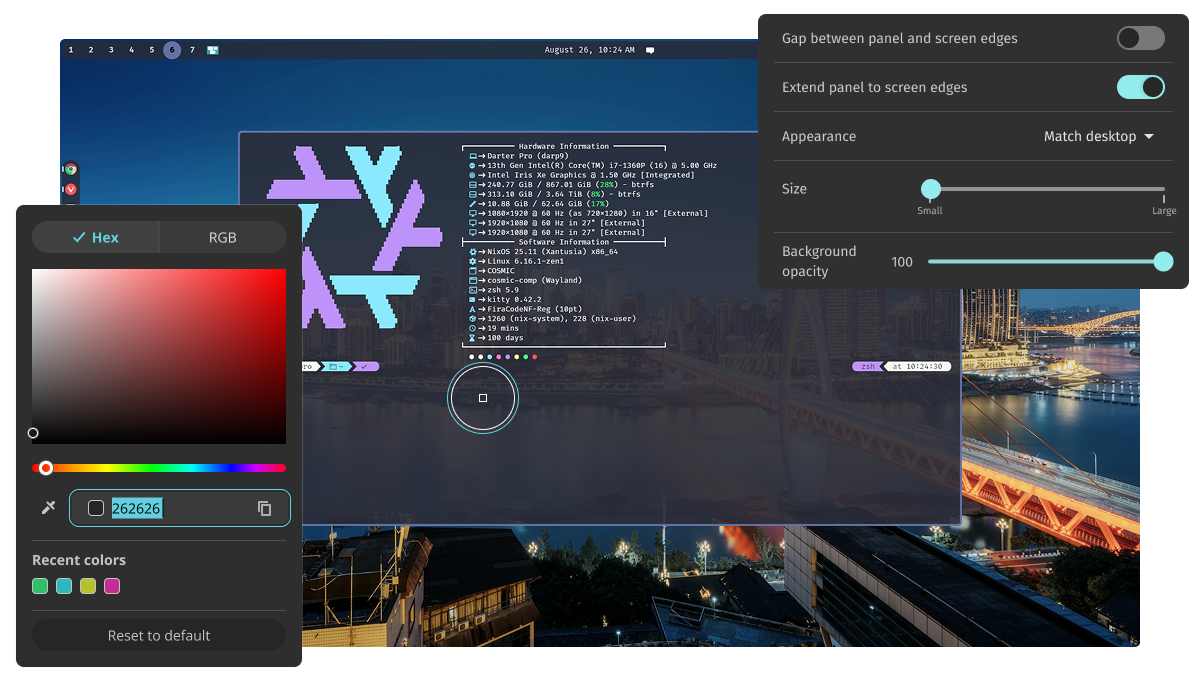
A major focus of this release is compatibility with the latest versions of GNOME and its associated libraries. Cosmic Desktop 1.0.8 now supports GNOME 44 and later, ensuring that users can take advantage of new features introduced in these versions without conflicts. This includes better integration with GNOME Settings, improved accessibility tools, and enhanced support for dark mode themes. For users who rely on KDE Plasma as their default desktop environment, the Cosmic Desktop team has also worked to ensure smoother coexistence with KDE components, reducing potential conflicts during system updates.
The update also includes improvements to the panel layout and application launcher. The panel now allows users to customize the position and size of widgets more precisely, while the application launcher has been optimized for faster search results. These changes are particularly useful for users who prefer a minimalist desktop setup or those who use multiple workspaces frequently. Additionally, the developers have introduced a new settings menu that consolidates various configuration options into a single location, making it easier for users to adjust settings without navigating through multiple menus.
For developers, version 1.0.8 introduces several API changes and bug fixes that improve the stability of the desktop environment. These updates include better error handling for extensions, which reduces the likelihood of crashes when using third-party plugins. The developers have also made it easier to debug and test new features by adding more detailed logging options. This is especially beneficial for users who contribute to open-source projects or who are experimenting with custom extensions for Cosmic Desktop.
Performance improvements are another key aspect of this release. The team has optimized memory usage, which should result in lower system resource consumption and better overall performance. This is particularly noticeable on older hardware, where the new optimizations can make a significant difference in responsiveness. Additionally, the update includes fixes for issues related to screen resolution detection, ensuring that displays are configured correctly even when using external monitors or docking stations.
Security is also a priority in this release. The developers have addressed several vulnerabilities that could potentially be exploited by malicious actors. These include fixes for issues related to input handling and permission management, which are critical for maintaining the security of user data. Users are encouraged to update their systems as soon as possible to ensure they are protected against these threats.
Overall, Cosmic Desktop 1.0.8 represents a major step forward in the evolution of the environment. Whether you’re a casual user looking for a more polished experience or a power user seeking greater control over your desktop, this update offers something for everyone. The improvements in performance, compatibility, and customization make it a compelling choice for Linux users who value both aesthetics and functionality. As the Linux ecosystem continues to grow, updates like these ensure that desktop environments remain competitive and user-friendly.