

Cosmic Desktop 1.0.5 has been released with several improvements and bug fixes. This update focuses on enhancing user experience, optimizing performance, and adding new tools for developers and users. The release includes updates to the panel, file manager, and system settings, along with compatibility improvements for Linux distributions. Developers worked on fixing issues reported by users, such as crashes, slow performance, and missing features. This article explains what’s new in this version and how to install it on your system.
Cosmic Desktop is a lightweight desktop environment designed for Linux users who want a fast and customizable interface. It combines elements of traditional Linux desktops with modern features like improved window management, customizable panels, and integration with Linux tools. The 1.0.5 version builds on previous releases by addressing user feedback and technical limitations. Key changes include a redesigned panel with enhanced shortcuts, a more efficient file manager with better search functionality, and improved support for high-resolution displays. Developers also optimized memory usage and fixed issues related to application launching and system stability.

One of the main updates in 1.0.5 is the redesigned panel. Users can now customize the panel’s appearance, add or remove widgets, and organize shortcuts more easily. The new layout allows for better multitasking by grouping applications and providing quick access to frequently used tools. The file manager received improvements to its search function, making it faster to locate files across the system. Additionally, the update includes better support for external drives and cloud storage integration, allowing users to access files from multiple sources seamlessly.
Performance improvements are a major focus of this release. Developers optimized the desktop environment to reduce resource consumption, which is especially beneficial for older or low-end hardware. The update includes tweaks to the rendering engine, ensuring smoother animations and faster transitions between windows. Memory management was also improved, reducing the likelihood of crashes or freezes during heavy usage. These optimizations make Cosmic Desktop more stable and efficient for everyday tasks.
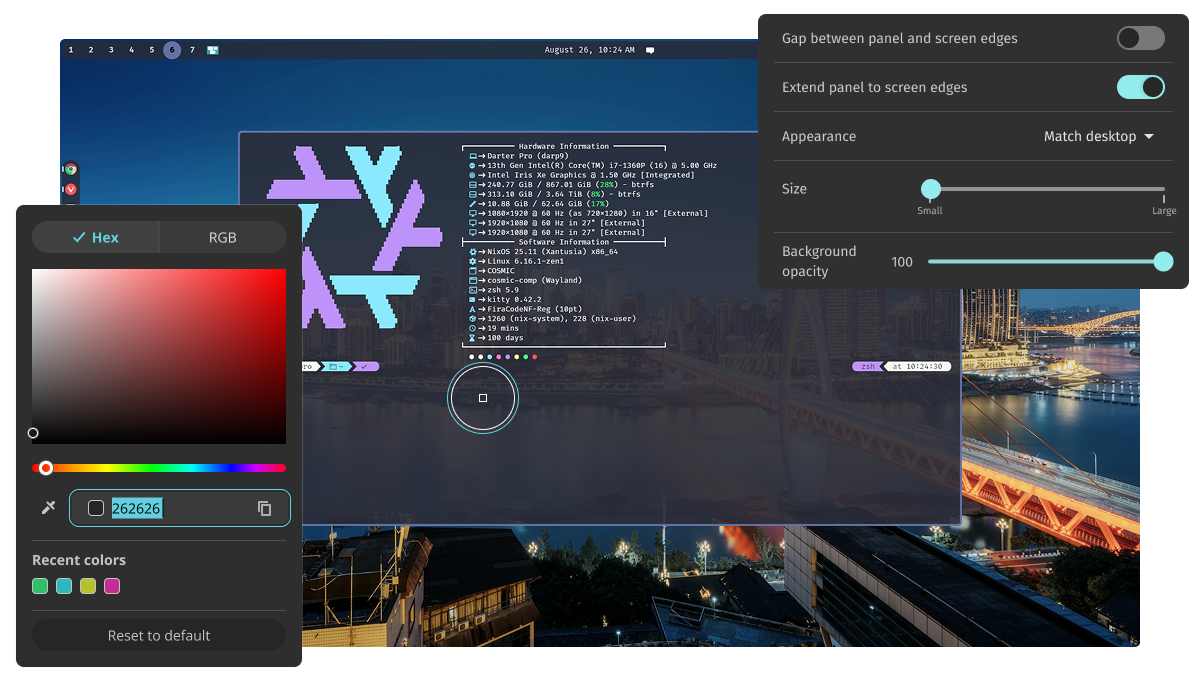
Another notable change is the enhanced system settings menu. Users can now adjust display settings, network configurations, and power management options directly from the desktop interface. The settings menu also includes a new section for developers, offering tools to debug applications and monitor system performance. This makes it easier for users to troubleshoot issues and customize their experience according to their needs.
To install Cosmic Desktop 1.0.5, users can download the latest package from the official repository or use package managers like APT or YUM. The installation process involves adding the repository to the system’s sources list, updating the package index, and installing the desktop environment. For distributions that do not support Cosmic Desktop natively, users may need to compile the source code or use third-party tools. Detailed instructions are available on the official website, along with compatibility information for different Linux versions.
The release of Cosmic Desktop 1.0.5 represents a significant step forward in making the desktop environment more user-friendly and efficient. By addressing common pain points and incorporating user feedback, the developers have created a version that balances simplicity with advanced features. Whether you are a casual user or a developer looking for a lightweight and customizable desktop, this update offers improvements that enhance productivity and system performance. As with any software update, it is recommended to back up important data before installing new versions to avoid potential issues.
Cosmic Desktop 1.0.5 is available now for Linux users who want a modern, efficient desktop environment. The update brings a range of improvements that make the desktop more responsive, customizable, and compatible with a wider range of hardware and software. By installing this version, users can take advantage of the latest features and ensure their system runs smoothly. For those interested in contributing to the project or reporting bugs, the official website provides resources for developers and community members.