

Skip to content
Tutorial emka
Menu
  • Home
  • Debian Linux
  • Ubuntu Linux
  • Red Hat Linux
Menu

Mabox Linux 26.02 Released with New Audio Menu Features

Posted on February 25, 2026

Mabox Linux 26.02, a Manjaro-based distribution, has officially launched with significant improvements to its audio management system. This update introduces a redesigned audio menu that simplifies sound configuration for users, while maintaining the lightweight and user-friendly nature of the Manjaro platform.

The new audio menu replaces older tools like PulseAudio with PipeWire, offering better compatibility with modern applications and hardware. Developers focused on improving system stability, performance, and accessibility in this release. Key changes include enhanced sound card detection, improved Bluetooth audio pairing, and support for newer audio codecs.

The update also brings security patches and kernel updates to ensure better hardware compatibility and protection against vulnerabilities. Users can download the ISO file from the official Mabox Linux website, which provides detailed installation guides and documentation.

The audio menu now integrates seamlessly with desktop environments like KDE Plasma and Xfce, allowing users to adjust volume levels, switch audio devices, and manage sound profiles without leaving their current application. This release targets both casual users and developers who rely on precise audio control for multimedia projects or professional workflows.
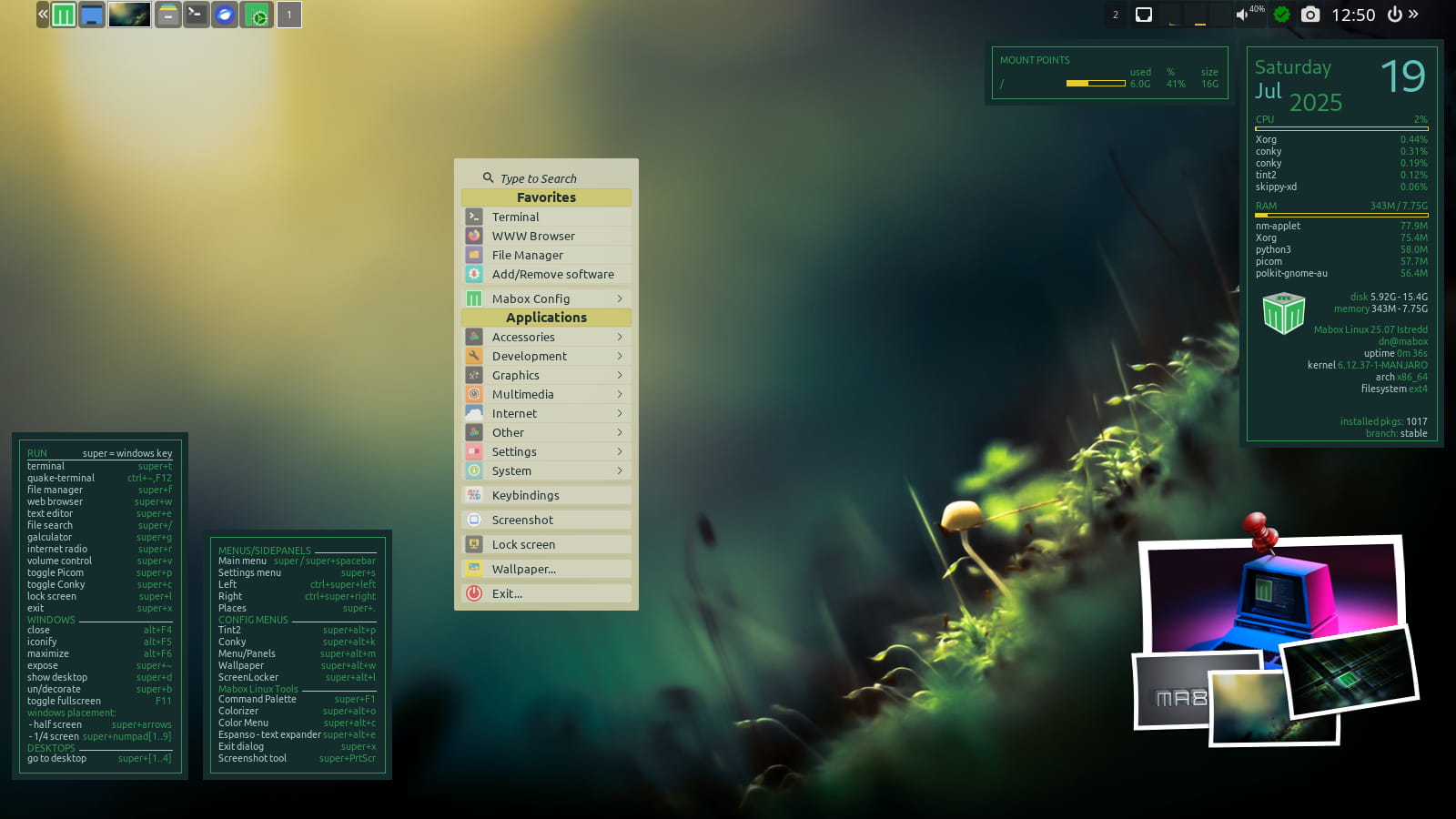
The team behind Mabox Linux emphasizes community contributions, with many features implemented based on user feedback from previous versions. The new audio menu uses a modular architecture, making it easier to customize and extend with third-party plugins.

For advanced users, the system provides command-line tools to fine-tune audio parameters, including latency settings and sample rate configurations. The distribution continues to leverage Manjaro’s rolling release model, ensuring users receive updates without needing to reinstall the operating system.

Security improvements include updated cryptographic libraries and hardened kernel configurations to prevent unauthorized access. The audio menu’s design also includes accessibility features, such as voice-activated commands and high-contrast visual indicators for users with disabilities.

This release demonstrates Mabox Linux’s commitment to modernizing audio management while preserving the simplicity and efficiency of the Manjaro platform. Users are encouraged to test the new features and report any issues through the official forums or bug tracking system.

The Mabox Linux team plans to release additional updates in the coming months, focusing on optimizing performance for newer hardware and expanding support for multimedia applications. The audio menu’s integration with PipeWire also enables better synchronization between audio and video streams, which is particularly useful for content creators and developers working on multimedia projects.

Overall, Mabox Linux 26.02 represents a major step forward in audio configuration capabilities, making it a compelling choice for users who require precise control over their system’s sound settings.

Recent Posts

  • How to build a high-performance private photo cloud with Immich and TrueNAS SCALE
  • How to Build an Endgame Local AI Agent Setup Using an 8-Node NVIDIA Cluster with 1TB Memory
  • How to Master Windows Event Logs to Level Up Your Cybersecurity Investigations and SOC Career
  • How to Build Ultra-Resilient Databases with Amazon Aurora Global Database and RDS Proxy for Maximum Uptime and Performance
  • How to Build Real-Time Personalization Systems Using AWS Agentic AI to Make Every User Feel Special
  • How to Transform Your Windows 11 Interface into a Sleek and Modern Aesthetic Masterpiece
  • How to Understand Google’s New TPU 8 Series for Massive AI Training and Inference
  • How to Level Up Your PC Gaming Experience with the New Valve Steam Controller and Its Advanced Features
  • Is it Time to Replace Nano? Discover Fresh, the Terminal Text Editor You Actually Want to Use
  • How to Design a Services Like Google Ads
  • How to Fix 0x800ccc0b Outlook Error: Step-by-Step Guide for Beginners
  • How to Fix NVIDIA App Error on Windows 11: Simple Guide
  • How to Fix Excel Formula Errors: Quick Fixes for #NAME
  • How to Clear Copilot Memory in Windows 11 Step by Step
  • How to Show Battery Percentage on Windows 11
  • How to Fix VMSp Service Failed to Start on Windows 10/11
  • How to Fix Taskbar Icon Order in Windows 11/10
  • How to Disable Personalized Ads in Copilot on Windows 11
  • What is the Microsoft Teams Error “We Couldn’t Connect the Call” Error?
  • Why Does the VirtualBox System Service Terminate Unexpectedly? Here is the Full Definition
  • Why is Your Laptop Touchpad Overheating? Here are the Causes and Fixes
  • How to Disable All AI Features in Chrome Using Windows 11 Registry
  • How to Avoid Problematic Windows Updates: A Guide to System Stability
  • What is Microsoft Visual C++ Redistributable and How to Fix Common Errors?
  • What is the 99% Deletion Bug? Understanding and Fixing Windows 11 File Errors
  • Inilah Jadwal Pelaksanaan SPMB SD Jakarta 2026
  • Tanggal Penerbitan KK & SKD untuk Pendaftaran SPMB 2026 Dimana?
  • Inilah Lima HP Xiaomi Rp1 Jutaan Sudah Punya NFC
  • Apa itu Jabatan Panitera Muda Mahkamah Agung, Berapa Gaji & Tunjangannya 2026?
  • Inilah Kenapa Bisa Ada Sensasi Mencekam di Bangunan Tua
  • How to Automate Your Entire SEO Strategy Using a Swarm of 100 Free AI Agents Working in Parallel
  • How to create professional presentations easily using NotebookLM’s AI power for school projects and beyond
  • How to Master SEO Automation with Google Gemini 3.1 Flash-Lite in Google AI Studio
  • How to create viral AI video ads and complete brand assets using the Claude and Higgsfield MCP integration
  • How to Transform Your Mac Into a Supercharged AI Assistant with Perplexity Personal Computer
  • Apa itu Spear-Phishing via npm? Ini Pengertian dan Cara Kerjanya yang Makin Licin
  • Apa Itu Predator Spyware? Ini Pengertian dan Kontroversi Penghapusan Sanksinya
  • Mengenal Apa itu TONESHELL: Backdoor Berbahaya dari Kelompok Mustang Panda
  • Siapa itu Kelompok Hacker Silver Fox?
  • Apa itu CVE-2025-52691 SmarterMail? Celah Keamanan Paling Berbahaya Tahun 2025
©2026 Tutorial emka | Design: Newspaperly WordPress Theme