

Ever wanted to make cool videos but felt your computer was struggling to keep up? Shotcut, a free and open-source video editor, just got a huge upgrade! Version 26.1 brings something called “hardware video decoding,” and it’s a game-changer for anyone who edits videos, especially on less powerful computers. Let’s dive into what that means and why it’s so awesome.
For a long time, when you edited videos in Shotcut (or any video editor), your computer’s processor (CPU) had to do all the work of figuring out what the video was, turning it into something your computer could understand, and then showing it on your screen. This is called decoding. It’s a very demanding task, and if the video is high-resolution (like 4K) or has lots of effects, it could slow your computer down considerably. You might see stuttering playback, lag when you try to move around the timeline, or even your computer freezing up entirely.
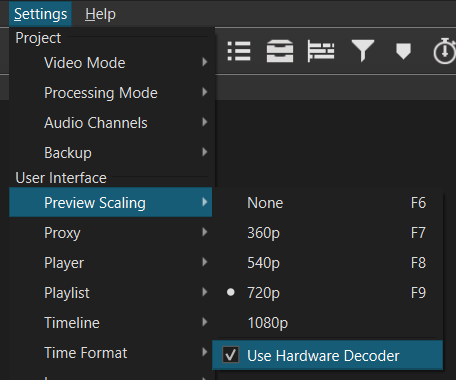
Hardware video decoding changes all that. Instead of relying solely on the CPU, Shotcut 26.1 can now use your computer’s graphics card (GPU) to handle the decoding. Your graphics card is designed specifically for handling images and videos, and it’s much better at it than your CPU. Think of it like this: your CPU is a general-purpose worker who can do lots of different jobs, while your GPU is a specialist who’s really good at video. By letting the GPU do the decoding, your CPU is freed up to handle other tasks, like applying effects, rendering, and keeping the program running smoothly.
So, how does it work in practice? Shotcut 26.1 automatically detects if your graphics card supports hardware decoding. It currently supports decoding using Intel Quick Sync Video, NVIDIA NVENC, and AMD VCE. These are technologies built into graphics cards from those manufacturers. When a supported video format is loaded, Shotcut will automatically use the GPU to decode it. You don’t need to do anything special – it just works!
This isn’t just about speed, although that’s a big benefit. Hardware decoding also reduces the load on your CPU, which means your computer will run cooler and quieter. This is especially important if you’re using a laptop, where overheating can be a problem. Less CPU load also means you can work with more complex projects, like videos with lots of layers, effects, and transitions, without your computer bogging down.
One of the clever things about Shotcut is that it’s smart about which videos to decode with hardware acceleration. It prioritizes decoding the video currently being played back, which is the part you’re actively working on. This ensures that you get the best possible performance while editing. It also handles multiple video streams efficiently, which is useful if you’re working with multi-camera footage or videos with picture-in-picture effects.
Now, there are a few things to keep in mind. Not all video formats are supported for hardware decoding yet. Currently, the focus is on common formats like H.264 and H.265 (HEVC), which are widely used for online videos and Blu-ray discs. Support for other formats will likely be added in future versions. Also, the performance gains you see will depend on your specific graphics card. A more powerful graphics card will generally provide a bigger boost.
Another important detail is that hardware decoding is primarily for decoding – turning the video into a format your computer can understand. It doesn’t necessarily speed up encoding – the process of creating a video file from your edited project. Encoding still relies heavily on the CPU, although some graphics cards (like NVIDIA and AMD) also offer hardware encoding capabilities, which Shotcut may utilize depending on the export settings.
Shotcut 26.1 also includes several other improvements and bug fixes. The developers have been working hard to improve the stability and usability of the program. There are tweaks to the audio editing tools, improvements to the color grading system, and various other enhancements that make Shotcut an even better video editor. The update also addresses some reported issues with timeline performance and rendering speed.
Beyond hardware decoding, Shotcut remains a remarkably powerful and versatile video editor, especially considering it’s free. It supports a wide range of video and audio formats, offers a comprehensive set of editing tools, and has a vibrant community of users who are always willing to help. The open-source nature of Shotcut means that it’s constantly being improved and updated, and the developers are responsive to user feedback.
Updating to Shotcut 26.1 is highly recommended, especially if you’ve ever experienced performance issues when editing videos. The hardware video decoding feature alone is a significant upgrade that can dramatically improve your editing experience. Even if you haven’t had problems in the past, the other improvements and bug fixes make it worthwhile to update. You can download the latest version from the Shotcut website. Give it a try and see how much faster and smoother your video editing workflow becomes!
via Shotcut