
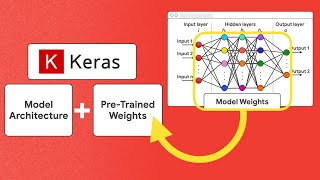
The AI landscape is exploding right now, but nothing is more annoying than finding a killer model architecture only to realize the pre-trained weights are locked into a framework you aren’t using. It’s a total buzzkill. Today, we’re fixing that by exploring how Keras Hub lets you seamlessly mix and match architectures with checkpoints from Hugging Face, regardless of the backend.
To really get what makes this technology so groundbreaking, we first need to dissect the two main components of any machine learning model: the architecture and the weights. Think of the model architecture as the blueprint of a house. It defines the structure—how the layers are stacked, how data flows, and what mathematical operations occur. In the coding world, we define this structure using frameworks like JAX, PyTorch, or TensorFlow. However, a blueprint alone can’t do much. That is where the model weights come in. These are the numerical parameters—the actual “knowledge”—that get tuned during the training process. You might hear people refer to these as checkpoints, which are essentially snapshots of these weights saved when the model performs well.
Traditionally, if you had a blueprint written in PyTorch, you needed weights saved in a PyTorch-compatible format. If you wanted to switch to JAX for its superior parallelization or XLA compilation, you were usually out of luck or stuck writing complex conversion scripts. This is where the friction usually happens, and frankly, it slows down innovation. Keras Hub steps in as the ultimate bridge. It is a library designed to handle popular model architectures in a way that is backend-agnostic. Because it is built on top of Keras 3, it natively supports JAX, TensorFlow, and PyTorch. This means the “blueprint” is flexible.
But what about the weights? This is the cool part. Hugging Face Hub is the go-to spot for community-shared checkpoints, often stored in the safetensors format. Keras Hub allows you to grab these checkpoints directly. It features built-in converters that handle the translation of these weights on the fly. You can take a Llama 3 checkpoint that was originally fine-tuned using PyTorch and load it directly into a Keras Hub model running on a JAX backend. There is no manual conversion required, and no headache. You essentially get the best of both worlds: the vast library of community fine-tuned models and the technical freedom to choose your computational backend.
This capability is massive for developers who want to experiment fast. Instead of being locked into the framework the original researcher used, you can pull their weights and run them in the environment that suits your production pipeline. Whether you are optimizing for inference speed with JAX or sticking to the familiar territory of TensorFlow, the model weights are no longer a limiting factor. It democratizes access to state-of-the-art AI, letting you focus on building applications rather than wrestling with compatibility errors.
Let’s get into the nitty-gritty of how you can actually pull this off. Here is a step-by-step guide to loading different high-performance models using Keras Hub:
Configure Your Backend
Before you touch any model code, you need to establish which framework Keras should use. This is done via an environment variable. If you want to leverage the speed of JAX, you would set os.environ[“KERAS_BACKEND”] = “jax”. You could just as easily swap “jax” for “torch” or “tensorflow”. This flexibility is the core superpower of Keras 3.
Loading a Mistral Model (Cybersecurity Focus)
Let’s say you want to use a model fine-tuned for cybersecurity. We can look at a checkpoint on Hugging Face called “Lily”. To load this, you utilize the MistralCausalLM class from Keras Hub. The magic command is from_preset. inside this method, you pass the Hugging Face path prefixed with hf://. For example: hf://finding-s/lily-cybersecurity. Keras Hub detects the prefix, downloads the weights, converts them, and populates the JAX-based architecture instantly.
Running Llama 3.1 (Fine-tuned Checkpoint)
Llama is everywhere right now. If you find a specific fine-tune, like the “X-Verify” checkpoint, the process is nearly identical. You simply switch your architecture class to Llama3CausalLM. When you call from_preset, you point it to the new Hugging Face handle, such as hf://start-gate/Llama-3-8B-Verify. With just that one line change, you are now running a completely different, highly complex model on your chosen backend.
Implementing Gemma (Multilingual Translation)
For our third example, we can look at Google’s Gemma model, specifically a checkpoint fine-tuned for translation called “ERA-X”. You would use the GemmaCausalLM class here. By pointing the preset to hf://jbochi/gemma-2b-translate, Keras Hub handles the rest. This proves that this isn’t a fluke for one specific model family; it works across Mistral, Llama, Gemma, and many others.
This approach completely changes the game for AI development. By separating the architecture from the weights and bridging the gap between frameworks, Keras Hub empowers you to use the right tools for the job without sacrificing access to the incredible work being done by the open-source community. You get the vast resources of Hugging Face combined with the engineering control of your preferred backend. It is time to stop worrying about compatibility matrices and start building cool stuff. If you found this breakdown useful, definitely give it a try in your next project.